New year, new me: Homelab Update 2026
When I last wrote about my homelab, I was running 3 microservers with different tasks. One was running my K3s Cluster, one was updated to be a Storage Host and one was an experimental testbed for other things. After adding service after service to my K3s cluster, I began to reach the limits of my passively cooled CPU, the fact that you could either have 10GbE or a GPU and the 16GB RAM, that was the maximum that the HPE Microserver could handle.
So after thinking about it for a long, long time, I finally made the decision to upgrade in the middle of 2025. And boy oh boy, would that turn out to be a lucky choice.
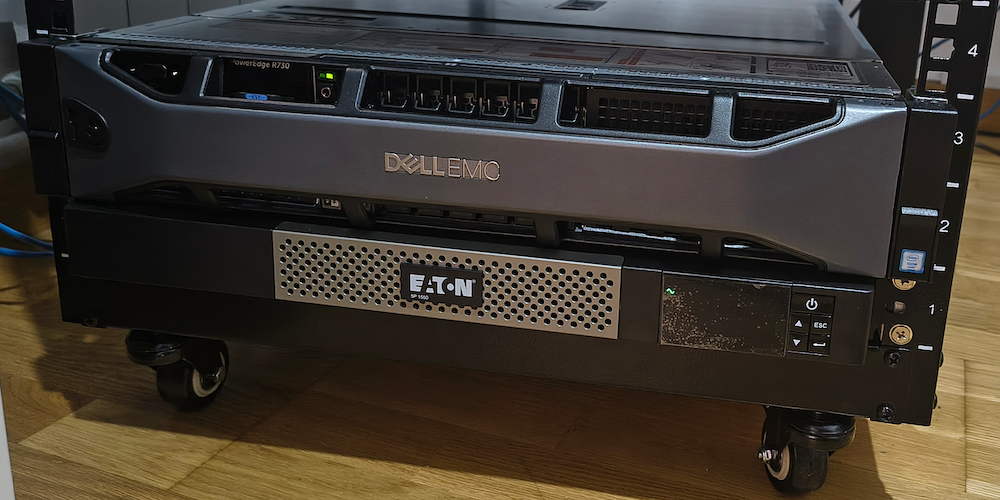
If you have been here before you might remember I said I was eyeing a few Dell R740xd. Well, a deal showed up at my doorstep — an R730 instead, but close enough. What followed was a rack, a UPS, a 10GbE switch and a pair of GPUs. Here is how it all came together.
Going on a shopping spree
For a long time I have been eyeing a Dell R730 on eBay, but I know that I wanted power, so I would not have to buy another one for the foreseeable future. So I looked around and thought about it: Do I really need this server? Is it too much? Does it use too much power? Is it too loud? Where do I put it?
Starting with the last question I looked around to find a rack, that I could put the rack mounted server, that I was about to buy, into. Funnily enough, after googling for a while and searching on the used market, the rack found me. For an affordable 80€ I would get an open 12U rack that was deep enough and on wheels.
After crossing the checkbox on where to put my server it was time to find the right one to buy. I settled quickly on the Dell R730, tried, tested and available, but I wanted a good package with enough CPU and RAM for virtualization. So I went for a dual Xeon E5-2690 v4 server with 256GB DDR4 RAM for 489€ including rails. Throwing in another 124€ for some Dell 1.8TB 2.5" 12G SAS HDDs so I can install Proxmox and start running some VMs.
After pressing buy and paying, I was anxiously waiting on my server, reading up on the manual. Turns out you are advised against running a server like that directly from the wall socket, obviously to protect from outages but also because home sockets provide incredibly dirty power and server PSUs are made for clean datacenter power. So I went back to eBay. And I found an amazing deal: a new Eaton 5P1550IR UPS. The catch? In storage for two years with untested batteries for 218€. I thought to myself: worth a shot, if the batteries are dead, I can order some new 3rd party ones and still come out on top.
Putting everything together
Everything arriving in the mail felt like Christmas. The rack arrived first and didn’t spend much time in the box before I took a Saturday to put it all together. Which was surprisingly a little harder than I thought. But in the end I prevailed.
After that the server and the UPS arrived and I began putting everything in the rack. I was fighting with the rails for a while, because expecting an 80€ rack to be in spec, is expecting the snow to fall in summer. Nothing that a little bit of filing and some hammering didn’t fix, as I wasn’t expecting to re-rack this server anytime soon, or ever for that matter.
Putting in the Eaton UPS was a breeze and running the tests revealed that the batteries were still good - jackpot!
Noise, heat and power
In terms of noise the Dell R730 seemed to be okay under low load and was also able to be tuned for lower fan RPMs and since I was about to put it in a separate “server room” away from my working desk, it also wasn’t the biggest of issues. Cooling turned out to be a small problem in summer, since the closed room will heat up to nearly 40°C, so keeping the door open to the air-conditioned living room means trading some noise for some cooling.
Coming to the power usage, I am incredibly lucky to live in a country that has invested into renewable energies and has plenty of sun, so I can enjoy a unbelievably low solar power tariff of 12ct per kWh. This means that even running this server 24/7 will not ruin my wallet any more than it already does. In the end the whole idle power draw of the homelab came out to roughly 500W.
Networking and GPUs
That was the foundation of the new homelab. After setting it all up and installing Proxmox, I decided that I need some more cheap upgrades. I wanted to have a connected, networked homelab and I still had plenty of HDD space on my Microservers that I needed to access.
So I went and bought a Mellanox ConnectX-3 Fiber Card and a cheap 10 port SFP+ switch from AliExpress, to create a 10GbE Storage Network. I didn’t buy them together. In the beginning I was running a P2P fiber connection between one of my Microservers and the R730. But then I found the ONTi 8-Port 10GbE SFP+ L3 Switch on AliExpress for an unbelievable 80€. My expectations were low, but it turned out to be a great little switch and on top of that, as I found out later, able to run OpenWRT.
And because transcoding on CPUs is horribly inefficient I bought two Nvidia Tesla P4 from China for another 80€ per GPU. Why two? Because they were relatively cheap and I didn’t want to play around with vGPUs, so one would be handed to the Kubernetes VM for Jellyfin and Frigate transcoding, which murders a CPU but barely tickles a P4, and another one would be spare for another VM or maybe even the Proxmox OS directly.
The new setup
So where did everything land? The R730 is now the heavy lifter running Proxmox:
- A K3s VM with a Tesla P4 passed through for Jellyfin and Frigate transcoding
- The 256GB of RAM finally lets me run VMs without counting megabytes
- The three Microservers got demoted to pure storage, served to the R730 over the new 10GbE network
The Microservers that used to fight over a single PCIe slot are now just spinning rust behind a fast network — exactly the split I wanted. With the package they offer, they are also a dream for a ZFS storage host: 8 CPU Cores, 16GB RAM and 4x12TB HDDs works perfectly, when you connect them with 10GbE, since the bottleneck is the HBA and SATA connection on the Microservers. Moving K3s from bare-metal to a VM is a story for another post.
The future of my homelab
As probably everybody has experienced by now, since I have gone on my shopping spree, prices have skyrocketed. The 12TB Seagates I picked up in 2024 for 120€ are now 450€. The server I bought goes for double or triple the price now. RAM is unobtanium and HDDs, even refurbished ones are just too expensive.
So, was it too much? Honestly — a little at the time. I am nowhere near using two Xeons and 256GB of RAM. But that is the point: I bought headroom, and looking back now, that was the cheapest decision I could have made.
I don’t think that will change anytime soon, but I am happy I invested when I invested. I still have enough headroom to expand, before I have to invest in some new hardware, and maybe something somewhere will happen that will bring prices down. Unlikely, but hope dies last.